owntrack-rs
Owntrack-rs
Overview
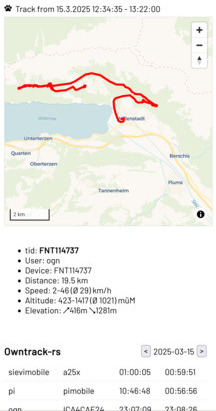
Owntrack-rs is a self-hosted GPS tracking solution that allows you to record and manage your location data from mobile phones or IoT devices. It provides OwnTracks compatible HTTP and MQTT endpoints, Meshtastic MQTT integration and a built-in viewer application.
Features:
- [x] Owntracks compatible HTTP endpoint
- [x] Owntracks compatible MQTT interface
- [x] Meshtastic compatible MQTT interface
- [x] SQLite local file storage
- [x] PostgreSQL database storage
- [x] GeoJSON and GPX track exports
- [x] Built-In Viewer
- [ ] Password protected and public views
- [x] Mobile friendly vector tile maps
Installation
Pre-built binaries
We provide several options to access pre-built binaries for a variety of platforms. If you would like to manually download a pre-built binary, checkout the latest release on GitHub.
Installer scripts
macOS and Linux:
curl --proto '=https' --tlsv1.2 -LsSf https://github.com/pka/owntrack-rs/releases/latest/download/owntrack-rs-installer.sh | sh
Docker
There is a Docker image available on Docker Hub.
Usage:
docker run -d --name owntrack-rs --rm -p 8083:8083 --user $(id -u):$(id -g) -v $PWD:/db -e DB_CONNECTION=sqlite://db/owntracks.sqlite sourcepole/owntrack-rs
Docker Compose
There is a sample docker-compose.yml file that can be used to run owntrack-rs with a SQLite database and a Caddy reverse proxy.
Copy docker-compose.yml and Caddyfile into an empty directory.
Setup your DNS pointing to the public IP address of your server.
Create an .env file with the following content:
#HTTP_ADDRESS=owntracks.example.org
OTRS_USERNAME=owntracks
OTRS_PASSWORD='private'
# docker compose exec caddy caddy hash-password --plaintext 'private'
OTRS_PASSWORD_HASH='$2a$14$CkbCQwO7/duJ/kCObNwEPeiZlmgXrWZ0PXah1DlfkCF70.BIwzZVC'
OTRS_DEVICE_ID=mobile
OTRS_TID=me

#MQTT_URL=mqtts://owntracks.example.org:8883
#MQTT_USER=otrecorder
#MQTT_PASSWORD='mypassword'
Make it readable for the current user only:
chmod 600 .env
Start the containers:
docker-compose up -d
Using the default values, owntrack-rs will be available at https://localhost with login user owntracks and password private.
Build From Source
For users who need to install owntrack-rs on platforms that we do not yet provide pre-built binaries for, you will need to build from source.
owntrack-rs is written in Rust and uses cargo to build. Once you've installed the Rust toolchain (rustup), run:
cargo install --path .
Setup & run
Run with default configuration:
owntrack-rs
Configuration options are passed as environment variables or read from a .env configuration file.
Configuration options:
HTTP_LISTEN: IP address and port to listen on. Default:0.0.0.0:8083
MQTT
For getting location data via MQTT, an MQTT broker like Mosquitto is required.
Configuration options:
MQTT_URL: MQTT broker URL. Example:mqtts://owntracks.example:8883MQTT_USER: MQTT user name.MQTT_PASSWORD: MQTT password.
SQLite database
Configuration options:
DB_CONNECTION: Database connection URL. Default:sqlite://owntracks.sqlite
PostgreSQL database
Create database:
psql postgres -c "CREATE DATABASE owntracks"
Configuration options:
DB_CONNECTION: libpq connection string or PostgreSQL URI. Example:postgres://user:pass@localhost:5432/owntracks
Setup tracking devices
OwnTracks apps
The OwnTracks apps can be used in MQTT or HTTP mode.
| iOS | Android |
|---|---|
 |
 |
For configuring the app, open the setup page of your hosted domain e.g. at https://owntracks.example.org/setup.
Meshtastic devices
Meshtastic devices can be integrated via MQTT.
Setup channel on nodes:
- Setup a primary channel with a private
PSK - Activate
uplink_enabledanddownlink_enabled(optional) - Set
position_precisionto32(full precision)
Configure position on nodes:
- Example values for a tracking node:
position.gps_update_interval: 10 secondsposition.position_broadcast_smart_enabled:trueposition.broadcast_smart_minimum_distance: 10 metresposition.broadcast_smart_minimum_interval_secs: 10 secondsposition.position_broadcast_secs: 120 seconds
Configure LoRa on nodes:
lora.ignore_mqtt:falselora.config_ok_to_mqtt:true
Setup an MQTT gateway node:
- Connect your gateway node to wifi, by setting the
network.wifi_ssid,network.wifi_pskandnetwork.wifi_enabledpreferences. - Configure your MQTT settings:
mqtt.address,mqtt.username, andmqtt.password.mqtt.encryption_enabled:falsemqtt.json_enabled:falsemqtt.tls_enabled: according to your MQTT server setupmqtt.root: according to your MQTT server setup. For an OnwTracks compatible setup use e.g.owntracks/<user>/msh.
Tested with Firmware 2.6.4.
Use your own devices
Send a POST request to the owntracks endpoint:
curl --data '{"_type":"location","lat":48.856826,"lon":2.292713,"tid":"me","tst":'$(date +%s)'}' -H "Content-Type: application/json" "http://127.0.0.1:8083/owntracks?u=me&d=mydevice"
Development
Prerequisites
Build and run application
cargo run
Frontend development
cd frontend
Preparation:
npm install
just ui